Thursday, 2 February 2017

SharePoint Field Types in Elements.xml file

Single Line of Text:

<Field id="{FDDC4E38-25E0-4FD9-92E7-D17F34A5AB12}" description="My Content ID of Item" staticname="ContentID" name="ContentID" displayname="ContentID" type="Text" group="Sample Site Columns" sourceid="http://schemas.microsoft.com/sharepoint/v3">


Number:

<Field ID="{13b3652a-d543-465d-91cb-a9d625637855}" StaticName="Read_Times" Name ="Read_Times" DisplayName ="Read_Times" Description="Read Time count of Item" Type="Number" Group ="Sample Site Columns" SourceID ="http://schemas.microsoft.com/sharepoint/v3">


Date Time:

<Field ID="{d076e4d5-c785-4c04-8b56-c1f021721749}" StaticName="CreateDate" Name="CreateDate" DisplayName="Create_Date" Description="Create Date of Item" Group="Sample Site Columns" Type="DateTime" Format="DateOnly" SourceID="http://schemas.microsoft.com/sharepoint/v3/fields">


Multiple lines of text:

<Field ID="{2ae59f08-0fb0-4a9c-8a31-a180161b1029}" StaticName="PublisherDescription" Name="PublisherDescription" Description="Publisher Description of Item" DisplayName="Publisher_Description" Type="Note" RichText="FALSE" NumLines="6" Group="Sample Site Columns" SourceID="http://schemas.microsoft.com/sharepoint/v3/fields">


Rich Text HTML:

<Field ID="{13cd0291-df15-4278-9894-630913e4d2b9}" StaticName="AccrediterDescription" Name="AccrediterDescription" DisplayName="Accrediter_Description" Description="Accrediter Description of Item" Type="Note" NumLines="6" RichText="TRUE" RichTextMode="FullHtml" Group="Sample Site Columns" SourceID="http://schemas.microsoft.com/sharepoint/v3/fields">


Publishing HTML:

<Field ID="{E2CC0231-FA6C-4F90-839C-118C304DFCF1}" StaticName="PMediaDescription" Name="PMediaDescription" DisplayName="MediaDescription" Type="HTML" RichText="TRUE" RichTextMode="ThemeHtml" Group="Site Columns" SourceID="http://schemas.microsoft.com/sharepoint/v3" UnlimitedLengthInDocumentLibrary ="TRUE">


Publishing Image:

<Field id="{148e8191-afe7-4422-b1d1-7202eda667f1}" description="Image 1 link of Item" staticname="PImageID1" name="PImageID1" displayname="Image_ID1" type="Image" group="My Site Columns" sourceid="http://schemas.microsoft.com/sharepoint/v3" richtext="TRUE" richtextmode="ThemeHtml">


HyperLink & Image:

<Field ID="{635a2031-2088-4413-b54e-d2af5daf08bf}" StaticName="ImageAuthor" Name="ImageAuthor" DisplayName="Image_Author" Description="Author Image" Type="URL" Format="Image" Group="Sample Site Columns" SourceID="http://schemas.microsoft.com/sharepoint/v3/fields">


YES/No Boolean:

<Field ID="{11018312-58f9-4eb0-867d-71298f82d98d}" Name="isActive" StaticName="isActive" DisplayName="isActive" Description="Select if Item is Active" Group="Sample Site Columns" SourceID="http://schemas.microsoft.com/sharepoint/v3" Type="Boolean"&gt;
<default>0</default>
</FIELD>


CHOICES:

<Field ID="{67f8faa4-e3ee-44bf-a3b4-6e7fc9c6b9fe}" Name="Market" StaticName="Market" DisplayName="Market" Description="Market of the Country" Group="Sample Site Columns" SourceID="http://schemas.microsoft.com/sharepoint/v3" Type="Choice"&gt;
<choices>
choice>Gold</choice
</choices>
</FIELD>


MultiSelect:

<Field Type="MultiChoice" DisplayName="Labels_Selected" FillInChoice="FALSE" Group="Sample Site Columns" ID="{2fdf0ba7-0052-4e9f-80f6-e7669ac4ae4f}" SourceID="http://schemas.microsoft.com/sharepoint/v3" StaticName="LabelsSelected" Name="LabelsSelected"&gt;
</FIELD>


Lookup Columns:

<Field Type="Lookup" ID="{FE45AC76-C0E2-46C8-A047-E8C43C10315C}" Name="LU_Country" StaticName="LU_Country" DisplayName="LU_Country" Required="FALSE" List="Lists/Region Country Master" ShowField="RollOutCountry" UnlimitedLengthInDocumentLibrary="FALSE" SourceID="http://schemas.microsoft.com/sharepoint/v3/fields" Group="Sample Site Columns">


Multi Lookup Columns:

<Field Type="LookupMulti" Mult="TRUE" ID="{85062ACF-315B-460A-B756-2230A5FE082F}" Name="LU_Language" StaticName="LU_Language" DisplayName="LU_Language" Required="FALSE" List="Lists/Language Master" ShowField="Title" UnlimitedLengthInDocumentLibrary="FALSE" SourceID="http://schemas.microsoft.com/sharepoint/v3/fields" Group="Sample Site Columns">


Lookup with Additional Field Lookup column:

<Field Type="Lookup" ID="{9AA2985D-AA17-4EA2-9556-9B0E112A64F6}" Name="LU_ApplicationType" StaticName="LU_ApplicationType" DisplayName="LU_ApplicationType" Required="FALSE" List="Lists/Application Type" ShowField="ApplicationType" UnlimitedLengthInDocumentLibrary="FALSE" SourceID="http://schemas.microsoft.com/sharepoint/v3/fields" Group="Sample Site Columns">

<Field Type="Lookup" ID="{668D51C4-804D-43E7-8211-950AE3BCD9A3}" Name="LU_ApplicationType_ID" StaticName="LU_ApplicationType_ID" DisplayName="LU_ApplicationType_ID" List="Lists/Application Type" ShowField="ApplicationTypeID" FieldRef="9AA2985D-AA17-4EA2-9556-9B0E112A64F6" ReadOnly="TRUE" UnlimitedLengthInDocumentLibrary="FALSE" SourceID="http://schemas.microsoft.com/sharepoint/v3/fields" Group="Sample Site Columns">


Note

New GUID can be generated using Tools -> Create GUID (select registy format)

Friday, 10 October 2014

The Feature is not a Farm Level feature and is not found in site defined by - Could not enable Feature

All wsp's have a feature id. We could obtain the feature id of the deployed wsp using the following command.

get-SPFeature

Now search for the feature id of the wsp that you want to enable to a site.
This feature could be activated using the following command.

Enable-SPFeature -Identity FeatureId -URL SiteCollectionURL -Force -PassThru

Note:
FeatureId  Will be the feature id of the wsp 
SiteCollectionURL will be the url of the site in which the wsp has to be enabled.

Sunday, 6 July 2014

Get current logged in user


    To get current logged in user for Sharepoint use this piece of code. You can use this code with custom forms where it gets the current logged in user name.


                        SPWeb getcurweb = SPControl.GetContextWeb(Context);
                        SPUser getcurlogeduser = getcurweb.CurrentUser;
                        string currentusername = getcurlogeduser.Name;


Wednesday, 4 June 2014

Check if current user belongs to particular group


To check if the current user belongs to particular group use the following code.


SPGroup Administrator_Group = SP_Web.Groups["Administrator"];
bool is_Administrator_Group =  SP_Web.IsCurrentUserMemberOfGroup(Administrator_Group.ID);


Tuesday, 11 March 2014

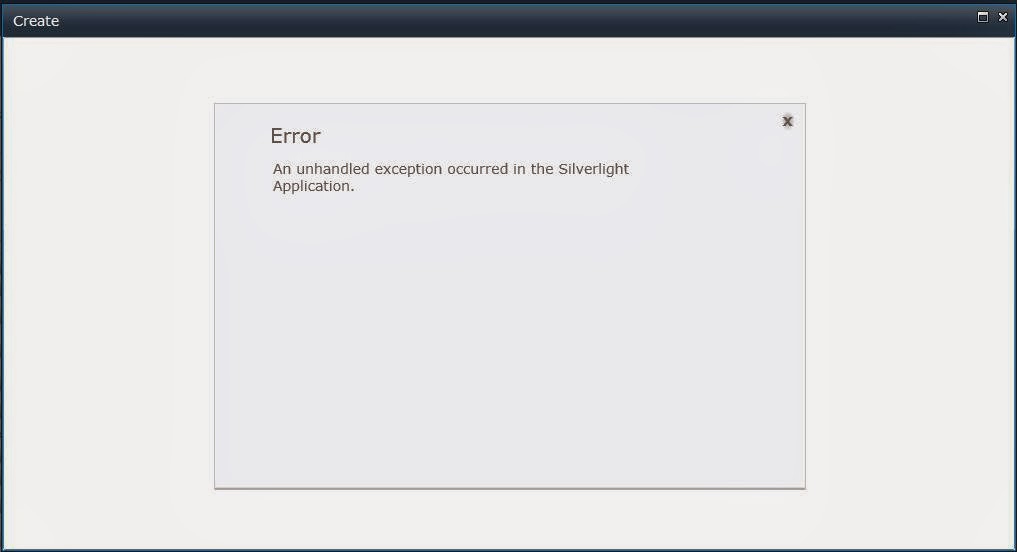
An unhandled exception occurred in the silverlight application sharepoint 2010


              When i try to create a new list or document library in my site, I came across this weird problem.


              The original problem is Silverlight application in sharepoint does not get connected to the Windows Communication Foundation. This dosent allow us to create a list or library in a site. This is just a security issue at server side  and could be resolved by following this procedure.                    


  1. Open Central Administration
  2. Select Application Management
  3. Select Manage Web Applications
  4. Select the Web Application where the error occurs
  5. In the ribbon, select General Settings
  6. In the Web Application General Settings dialog box, find Web Page Security Validation and select On 

This resolves the problem and now a new list or library could be created.                         


Thursday, 6 March 2014

Create site in a new Content Database Sharepoint 2010


      whenever i tried to create a new site in the server it takes up only default content database. I was looking after to create a new site in a separate content database. Unfortunately when i try to create a new site it does not ask me an option to choose the content database that i would like to create the site.

img

I dig up and found that this could be achieved using powershell.

First create a content database using central administration.
To create,

  1)  Central Administration -> Application Management -> Manage Content Databases under Databases.


2) You can see a content database that is already available by default. Here you have to add a new content database. Click Add a Content database.


3) You could rename the database name. Provide appropriate name for your database. Click ok.


4) Now you could see a new content database is created.

  To create a new site in that particular created content database use this following script in posershell.


Powershell Command:

New-SPSite http://yourServerName/sites/YourSite -OwnerAlias "ServerAdministratorUserName" -ContentDatabase ContentDatabaseName -Name "SiteNametobeCreated" -Description "DescriptionabouttheSite" -Template "STS#0"

On successful creation of site over the created database, you will receive this created url.


Thursday, 13 February 2014

Server Dependency error (Missing Feature)


          When we redeploy wsp files in sharepoint server, it will check for its previous version using the feature ID. The old versions feature id will not be available since wsp files has been removed. Though the files have been removed its id will be available in the server.

           It will throw an exception and this exception will be stored in the configuration section. When site content backup is restored this error transfers to the other server too. This exceptions can be removed by using power shell command.

          Go to the following location. Central Administration --> Monitoring --> Review Problems and Solutions under Health Analyzer. Under category configuration click Missing Server side dependencies. There you will find [Missing Feature] type. Now go to Sharepoint Power Shell. and do the following.

PowerShell Remove Features in SharePoint because of Health Issue For "Missing Feature"


Run The below power shell Method in SharePoint Management shell.

 function Remove-SPFeatureFromContentDB($ContentDb, $FeatureId, [switch]$ReportOnly)
{
    $db = Get-SPDatabase | where { $_.Name -eq $ContentDb }
    [bool]$report = $false
    if ($ReportOnly) { $report = $true }
   
    $db.Sites | ForEach-Object {
       
        Remove-SPFeature -obj $_ -objName "site collection" -featId $FeatureId -report $report
               
        $_ | Get-SPWeb -Limit all | ForEach-Object {
           
            Remove-SPFeature -obj $_ -objName "site" -featId $FeatureId -report $report
        }
    }
}
function Remove-SPFeature($obj, $objName, $featId, [bool]$report)
{
    $feature = $obj.Features[$featId]
   
    if ($feature -ne $null) {
        if ($report) {
            write-host "Feature found in" $objName ":" $obj.Url -foregroundcolor Red
        }
        else
        {
            try {
                $obj.Features.Remove($feature.DefinitionId, $true)
                write-host "Feature successfully removed from" $objName ":" $obj.Url -foregroundcolor Red
            }
            catch {
                write-host "There has been an error trying to remove the feature:" $_
            }
        }
    }
    else {
        #write-host "Feature ID specified does not exist in" $objName ":" $obj.Url
    }
}


To run only a report (-ReportOnly property):
Remove-SPFeatureFromContentDB -ContentDB "Content_DBName" -FeatureId "e8389ec7-70fd-4179-a1c4-6fcb4342d7a0" –ReportOnly

To remove the feature from all sites, site collections in the db run (no -ReportOnly property):
Remove-SPFeatureFromContentDB -ContentDB "Content_DBName" -FeatureId "8096285f-1473-45c7-85b7-f745e5b2cf29"  


   This will work only for [Missing Feature] issues.

Monday, 3 February 2014

XSLT Conditional formatting for sharepoint 2013


<Xsl>
<xsl:stylesheet xmlns:x="http://www.w3.org/2001/XMLSchema" xmlns:d="http://schemas.microsoft.com/sharepoint/dsp" version="1.0" exclude-result-prefixes="xsl msxsl ddwrt" xmlns:ddwrt="http://schemas.microsoft.com/WebParts/v2/DataView/runtime" xmlns:asp="http://schemas.microsoft.com/ASPNET/20" xmlns:__designer="http://schemas.microsoft.com/WebParts/v2/DataView/designer" xmlns:xsl="http://www.w3.org/1999/XSL/Transform" xmlns:msxsl="urn:schemas-microsoft-com:xslt" xmlns:SharePoint="Microsoft.SharePoint.WebControls" xmlns:ddwrt2="urn:frontpage:internal" xmlns:o="urn:schemas-microsoft-com:office:office">
  <xsl:include href="/_layouts/xsl/main.xsl"/>
  <xsl:include href="/_layouts/xsl/internal.xsl"/>
  <xsl:param name="AllRows" select="/dsQueryResponse/Rows/Row[$EntityName = '' or (position() &gt;= $FirstRow and position() &lt;= $LastRow)]"/>
  <xsl:param name="dvt_apos">&apos;</xsl:param>
<xsl:template name="FieldRef_Hyperlink_URL_body.Details" ddwrt:dvt_mode="body" match="FieldRef[(@Format='Hyperlink') and @Name='Details']" mode="URL_body" ddwrt:ghost="">
    <xsl:param name="thisNode" select="."/>
    <xsl:variable name="url" select="$thisNode/@*[name()=current()/@Name]" />
    <xsl:variable name="desc" select="$thisNode/@*[name()=concat(current()/@Name, '.desc')]" />
    <xsl:choose>
      <xsl:when test="$url=''">
        <xsl:if test="$desc=''">
          <xsl:value-of select="$desc"/>
        </xsl:if>
      </xsl:when>
      <xsl:otherwise>
        <xsl:choose>
<xsl:when test="$desc=''">
              <xsl:value-of select="$url" /></xsl:when>
<xsl:otherwise>
<a href="{$url}"><img alt="Status" src="../../../Style Library/Images/img-icon-discuss.png" border="0" /></a>
</xsl:otherwise>
</xsl:choose>
      </xsl:otherwise>
    </xsl:choose>
  </xsl:template>

<xsl:template name="FieldRef_header.Approvers" ddwrt:dvt_mode="header" match="FieldRef[@Name='Approvers']" mode="header" ddwrt:ghost="" xmlns:ddwrt2="urn:frontpage:internal">
    <th nowrap="nowrap" scope="col" onmouseover="OnChildColumn(this)" style="width: 81px">
      <xsl:attribute name="class">
        <xsl:choose>
          <xsl:when test="(@Type='User' or @Type='UserMulti') and ($PresenceEnabled='1')">ms-vh</xsl:when>
          <xsl:otherwise>ms-vh2</xsl:otherwise>
         </xsl:choose>
      </xsl:attribute>
      <xsl:call-template name="dvt_headerfield">
        <xsl:with-param name="fieldname">
          <xsl:value-of select="@Name"/>
        </xsl:with-param>
        <xsl:with-param name="fieldtitle">
          <xsl:value-of select="@DisplayName"/>
        </xsl:with-param>
        <xsl:with-param name="displayname">
          <xsl:value-of select="@DisplayName"/>
        </xsl:with-param>
        <xsl:with-param name="fieldtype">
          <xsl:choose>
            <xsl:when test="@Type='Number' or @Type='Currency'">number</xsl:when>
            <xsl:otherwise>x:string</xsl:otherwise>
          </xsl:choose>
        </xsl:with-param>
      </xsl:call-template>
    </th>
  </xsl:template>
<xsl:template name="FieldRef_header.Document_x0020_Status" ddwrt:dvt_mode="header" match="FieldRef[@Name='Document_x0020_Status']" mode="header" ddwrt:ghost="" xmlns:ddwrt2="urn:frontpage:internal">
    <th nowrap="nowrap" scope="col" onmouseover="OnChildColumn(this)" style="width: 191px">
      <xsl:attribute name="class">
        <xsl:choose>
          <xsl:when test="(@Type='User' or @Type='UserMulti') and ($PresenceEnabled='1')">ms-vh</xsl:when>
          <xsl:otherwise>ms-vh2</xsl:otherwise>
         </xsl:choose>
      </xsl:attribute>
      <xsl:call-template name="dvt_headerfield">
        <xsl:with-param name="fieldname">
          <xsl:value-of select="@Name"/>
        </xsl:with-param>
        <xsl:with-param name="fieldtitle">
          <xsl:value-of select="@DisplayName"/>
        </xsl:with-param>
        <xsl:with-param name="displayname">
          <xsl:value-of select="@DisplayName"/>
        </xsl:with-param>
        <xsl:with-param name="fieldtype">
          <xsl:choose>
            <xsl:when test="@Type='Number' or @Type='Currency'">number</xsl:when>
            <xsl:otherwise>x:string</xsl:otherwise>
          </xsl:choose>
        </xsl:with-param>
      </xsl:call-template>
    </th>
  </xsl:template>
<xsl:template name="FieldRef_printTableCell_EcbAllowed.Approvers" match="FieldRef[@Name='Approvers']" mode="printTableCellEcbAllowed" ddwrt:dvt_mode="body" ddwrt:ghost="" xmlns:ddwrt2="urn:frontpage:internal">
    <xsl:param name="thisNode" select="."/>
    <xsl:param name="class" />
    <td style="width: 81px">
      <xsl:if test="@ClassInfo='Menu' or @ListItemMenu='TRUE'">
        <xsl:attribute name="height">100%</xsl:attribute>
        <xsl:attribute name="onmouseover">OnChildItem(this)</xsl:attribute>
      </xsl:if>
      <xsl:attribute name="class">
        <xsl:call-template name="getTDClassValue">
          <xsl:with-param name="class" select="$class" />
          <xsl:with-param name="Type" select="@Type"/>
          <xsl:with-param name="ClassInfo" select="@ClassInfo"/>
        </xsl:call-template>
      </xsl:attribute>
      <xsl:apply-templates select="." mode="PrintFieldWithECB">
        <xsl:with-param name="thisNode" select="$thisNode"/>
      </xsl:apply-templates>
    </td>
  </xsl:template>
<xsl:template name="FieldRef_printTableCell_EcbAllowed.Document_x0020_Status" match="FieldRef[@Name='Document_x0020_Status']" mode="printTableCellEcbAllowed" ddwrt:dvt_mode="body" ddwrt:ghost="">
    <xsl:param name="thisNode" select="."/>
    <xsl:param name="class" />
    <td>
<xsl:attribute name="style">
<xsl:if test="normalize-space($thisNode/@Document_x0020_Status) = 'Draft in Progress'" xmlns:ddwrt="http://schemas.microsoft.com/WebParts/v2/DataView/runtime" ddwrt:cf_explicit="1">color: #FAAC32; font-weight: bold; background-image: url(&apos;../../../Style Library/Images/img-icon-inprogress.png&apos;); background-repeat: no-repeat; background-position: right center;</xsl:if>
<xsl:if test="normalize-space($thisNode/@Document_x0020_Status) = 'Assigned to 3rd party Lawyer'" xmlns:ddwrt="http://schemas.microsoft.com/WebParts/v2/DataView/runtime" ddwrt:cf_explicit="1">color: #FAAC32; font-weight: bold; background-image: url(&apos;../../../Style Library/Images/img-icon-inprogress.png&apos;); background-repeat: no-repeat; background-position: right center;</xsl:if>
<xsl:if test="normalize-space($thisNode/@Document_x0020_Status) = 'Assigned to 3rd Party Lawyer'" xmlns:ddwrt="http://schemas.microsoft.com/WebParts/v2/DataView/runtime" ddwrt:cf_explicit="1">color: #FAAC32; font-weight: bold; background-image: url(&apos;../../../Style Library/Images/img-icon-inprogress.png&apos;); background-repeat: no-repeat; background-position: right center;</xsl:if>
<xsl:if test="normalize-space($thisNode/@Document_x0020_Status) = 'Approval in Progress'" xmlns:ddwrt="http://schemas.microsoft.com/WebParts/v2/DataView/runtime" ddwrt:cf_explicit="1">color: #FAAC32; font-weight: bold; background-image: url(&apos;../../../Style Library/Images/img-icon-inprogress.png&apos;); background-repeat: no-repeat; background-position: right center;</xsl:if>
<xsl:if test="normalize-space($thisNode/@Details) = 'Review in progress'" xmlns:ddwrt="http://schemas.microsoft.com/WebParts/v2/DataView/runtime" ddwrt:cf_explicit="1">color: #FAAC32; font-weight: bold; background-image: url(&apos;../../../Style Library/Images/img-icon-inprogress.png&apos;); background-repeat: no-repeat; background-position: right center;</xsl:if>
<xsl:if test="normalize-space($thisNode/@Document_x0020_Status) = 'Review in progress'" xmlns:ddwrt="http://schemas.microsoft.com/WebParts/v2/DataView/runtime" ddwrt:cf_explicit="1">color: #FAAC32; font-weight: bold; background-image: url(&apos;../../../Style Library/Images/img-icon-inprogress.png&apos;); background-repeat: no-repeat; background-position: right center;</xsl:if>
<xsl:if test="normalize-space($thisNode/@Document_x0020_Status) = 'Approver Rejected'" ddwrt:cf_explicit="1" xmlns:ddwrt="http://schemas.microsoft.com/WebParts/v2/DataView/runtime">color: #FF0000; font-weight: bold; background-image: url(&apos;../../../Style Library/Images/img-icon-rejected.png&apos;); background-repeat: no-repeat; background-position: right center;</xsl:if>

<xsl:if test="normalize-space($thisNode/@Document_x0020_Status) = 'Reviewer Rejected'" ddwrt:cf_explicit="1" xmlns:ddwrt="http://schemas.microsoft.com/WebParts/v2/DataView/runtime">color: #FF0000; font-weight: bold; background-image: url(&apos;../../../Style Library/Images/img-icon-rejected.png&apos;); background-repeat: no-repeat; background-position: right center;</xsl:if>
<xsl:if test="normalize-space($thisNode/@Document_x0020_Status) = 'Pending Signature'" ddwrt:cf_explicit="1" xmlns:ddwrt="http://schemas.microsoft.com/WebParts/v2/DataView/runtime">color: #FAAC32; font-weight: bold; background-image: url(&apos;../../../Style Library/Images/img-icon-inprogress.png&apos;); background-repeat: no-repeat; background-position: left center;</xsl:if>

<xsl:if test="normalize-space($thisNode/@Document_x0020_Status) = 'Pending Signature'" ddwrt:cf_explicit="1" xmlns:ddwrt="http://schemas.microsoft.com/WebParts/v2/DataView/runtime">color: #FAAC32; font-weight: bold; background-image: url(&apos;../../../Style Library/Images/img-icon-inprogress.png&apos;); background-repeat: no-repeat; background-position: right center;</xsl:if>

<xsl:if test="normalize-space($thisNode/@Document_x0020_Status) = 'Not Started'" ddwrt:cf_explicit="1" xmlns:ddwrt="http://schemas.microsoft.com/WebParts/v2/DataView/runtime">color: #FAAC32; font-weight: bold; background-image: url(&apos;../../../Style Library/Images/img-icon-inprogress.png&apos;); background-repeat: no-repeat; background-position: right center;</xsl:if>
<xsl:if test="normalize-space($thisNode/@Document_x0020_Status) = 'Active'" ddwrt:cf_explicit="1" xmlns:ddwrt="http://schemas.microsoft.com/WebParts/v2/DataView/runtime">background-image: url(&apos;../../../Style Library/Images/img-icon-approved.png&apos;); background-repeat: no-repeat; background-position: right center; font-weight: bold; color: #56C553;</xsl:if>
<xsl:if test="normalize-space($thisNode/@Document_x0020_Status) = 'Over Due'" ddwrt:cf_explicit="1" xmlns:ddwrt="http://schemas.microsoft.com/WebParts/v2/DataView/runtime">color: #FF0000; font-weight: bold; background-image: url(&apos;../../../Style Library/Images/Overdue(2).png&apos;); background-repeat: no-repeat; background-position: right center;</xsl:if>

</xsl:attribute>

      <xsl:if test="@ClassInfo='Menu' or @ListItemMenu='TRUE'">
        <xsl:attribute name="height">100%</xsl:attribute>
        <xsl:attribute name="onmouseover">OnChildItem(this)</xsl:attribute>
      </xsl:if>
      <xsl:attribute name="class">
        <xsl:call-template name="getTDClassValue">
          <xsl:with-param name="class" select="$class" />
          <xsl:with-param name="Type" select="@Type"/>
          <xsl:with-param name="ClassInfo" select="@ClassInfo"/>
        </xsl:call-template>
      </xsl:attribute>
      <xsl:apply-templates select="." mode="PrintFieldWithECB">
        <xsl:with-param name="thisNode" select="$thisNode"/>
      </xsl:apply-templates>
    </td>
  </xsl:template>
<xsl:template name="FieldRef_header.Details" ddwrt:dvt_mode="header" match="FieldRef[@Name='Details']" mode="header" ddwrt:ghost="" xmlns:ddwrt2="urn:frontpage:internal">
    <th nowrap="nowrap" scope="col" onmouseover="OnChildColumn(this)" style="width: 69px">
      <xsl:attribute name="class">
        <xsl:choose>
          <xsl:when test="(@Type='User' or @Type='UserMulti') and ($PresenceEnabled='1')">ms-vh</xsl:when>
          <xsl:otherwise>ms-vh2</xsl:otherwise>
         </xsl:choose>
      </xsl:attribute>
      <xsl:call-template name="dvt_headerfield">
        <xsl:with-param name="fieldname">
          <xsl:value-of select="@Name"/>
        </xsl:with-param>
        <xsl:with-param name="fieldtitle">
          <xsl:value-of select="@DisplayName"/>
        </xsl:with-param>
        <xsl:with-param name="displayname">
          <xsl:value-of select="@DisplayName"/>
        </xsl:with-param>
        <xsl:with-param name="fieldtype">
          <xsl:choose>
            <xsl:when test="@Type='Number' or @Type='Currency'">number</xsl:when>
            <xsl:otherwise>x:string</xsl:otherwise>
          </xsl:choose>
        </xsl:with-param>
      </xsl:call-template>
   
    </th>
  </xsl:template>
<xsl:template name="FieldRef_printTableCell_EcbAllowed.Details" match="FieldRef[@Name='Details']" mode="printTableCellEcbAllowed" ddwrt:dvt_mode="body" ddwrt:ghost="" xmlns:ddwrt2="urn:frontpage:internal">
    <xsl:param name="thisNode" select="."/>
    <xsl:param name="class" />
    <td style="width: 69px">
      <xsl:if test="@ClassInfo='Menu' or @ListItemMenu='TRUE'">
        <xsl:attribute name="height">100%</xsl:attribute>
        <xsl:attribute name="onmouseover">OnChildItem(this)</xsl:attribute>
      </xsl:if>
      <xsl:attribute name="class">
        <xsl:call-template name="getTDClassValue">
          <xsl:with-param name="class" select="$class" />
          <xsl:with-param name="Type" select="@Type"/>
          <xsl:with-param name="ClassInfo" select="@ClassInfo"/>
        </xsl:call-template>
      </xsl:attribute>
      <xsl:apply-templates select="." mode="PrintFieldWithECB">
        <xsl:with-param name="thisNode" select="$thisNode"/>
      </xsl:apply-templates>
    </td>
  </xsl:template>
</xsl:stylesheet></Xsl>

Tuesday, 7 January 2014

Default permission levels in Sharepoint 2013

SharePoint 2013 includes seven permission levels:

- View Only: It enables users to view application pages.

- Limited Access: It enables users to access shared resources and a specific asset. Limited Access cannot be edited or deleted.

- Read: It enables users to view pages and list items, and to download documents.

- Contribute: Contribute enables users to manage personal views, edit items and user information, delete versions in existing lists and document libraries, and add, remove, and update personal Web Parts.

- Edit: It enables users to manage lists.

- Design: Design permission level enables users to view, add, update, delete, approve, and customize items or pages in the website.

- Full Control: It enables users to have full control of the website.

Apart from this SharePoint 2013 also provides some permission levels to templates other than team site template. These are below:

- Restricted Read: This permission level is only for Publishing sites only. It enables View pages and documents.

- Approve: This permission level is only for Publishing sites only. It enables Edit and approve pages, list items, and documents.

- Manage Hierarchy: This permission level is only for Publishing sites only. Create sites; edit pages, list items, and documents, and change site permissions.

Thursday, 2 January 2014

Deleting error webpart without using designer


          I was using a ReportViewerWebPart webpart at my home page. Sometimes during deployment this cause trouble that i could not open my home page since in some servers reports was not configured. I was resolving it using Sharepoint designer. I would open up my home page with sharepoint designer delete the webpart and now i could open my home page.

         Now i have found an alternate solution for this. We could use Web Part Page Maintenance for deleting this error web part. The solution is,

Procedure:

     Add the value ?Contents=1 at the end of your site.

     It now looks like http://yourservername/sites/yoursitename?Contents=1

     Hit Enter, that leads you to webpart maintenance page.

        
  The "Open on Page" shows error if that webpart contains error. you can select that particular webpart and delete it.

     Now the error webparts in homepage is deleted and the home page is displayed without the error webparts.

Monday, 30 December 2013

Hide Quick Launch in Sharepoint 2013


         Earlier in my post , http://prasath04sharepoint.blogspot.in/2013/05/hide-top-bar-ribbon-quick-launch-in.html we had took a look on hiding quick launch controls in sharepoint 2010. Unfortunately this method doesn't work with Sharepoint 2013.

For hiding quick launch at Sharepoint 2013 we have to use different css.

To hide only Quick Launch Panel from the view

Add the following css code in the Application Page under PlaceHolderMain section.

<style type="text/css">
 #sideNavBox {DISPLAY: none}
 #contentBox {MARGIN-LEFT: 5px}
</style>

Tuesday, 17 December 2013

Get Current User Email by sharepoint 2013 Object Model


Hi,


   Here we will write sharepoint 2013 object model code to retrieve current user email id. 
Use the following code.

string strUserName = HttpContext.Current.User.Identity.Name.ToString();

string strEmail = SPContext.Current.Web.AllUsers[strUserName].Email;

First we will retrieve the user name and then we will retrieve the email id.

Automation of Reports(Send reports as mail regularly)


Hi,


    I was always wondering weather i could automate reports in Sharepoint. My idea is, rather than viewing the reports from sharepoint site what if i get a daily reports by mail ? Here is the procedure on how to configure to get a daily reports via mail.

For this purpose you need a working report in shareopint site.

Choose , Microsoft SQL Server 2008 r2 Ã   Configuration Tools Ã  Reporting Service Configuration Manager


The Reporting Service Configuration Connection opens up. Ensure correct Server  Name and Report Server Instance and click Connect.


Choose E-mail Settings and provide your outgoing mail address and your server name. Click Apply and save changes.


Now point dropdown at your report and choose "Manage Subscriptions".


Click on Add Subscription.


On the To Section provide the mail address for whom the report has to be sent as mail. Also you can configure appropriate time during which the report will be delivered. In Report Contents section you can also choose the format that you wish to deliver the report(PDF, World, Excel, MHTML etc..,). Click ok and you can find the subscription is added to the report and is available.


This will deliver the report as mail to the particular mail id that was mentioned.


Monday, 16 December 2013

Different types in Updating Sharepoint List


            While creating Event Receivers or Workflows we need to update the list or list items using SPListItem method. However there are different types in updating. Most commonly used are Update and SystemUpdate. lets see the different types of updates and its use.


Update()


  • Updates the item in the database.
  • Updates the “Modified” and “Modified by” values.
  • Creates a new version.

Systemupdate()


  • Updates the item in the database(List).
  • Does not update build in columns "Modified" and "Modified By".
  • Does not increment item version.
  • Triggers the item events.

Systemupdate(true)


  • Updates data to database(List).
  • Does not update build in columns "Modified" and "Modified By".
  • Will increment Item Version.

Systemupdate(false)


  • Updates data to database.
  • Does not update build in columns "Modified" and "Modified By".
  • Does not increment item version.

UpdateOverwriteVersion()


  • Updates data to database.
  • Updates build in columns "Modified" and "Modified By".
  • Does not increment new version.

Note :


You can also disable the triggering of events by using “this.EventFiringEnabled = false;”. Do your update and enable the events again with “this.EventFiringEnabled = true;”

Friday, 27 September 2013

PowerShell script to delete all items in a List


Deleting items from your list can be done in a easier way using the shell script. 
This is much easier when compared to deleting items from the browser. 

1) Copy & paste the following script in a notepad. 

2) Provide your site name mentioned at $SITEURL = "http://your server"

3) Provide your list name as it in browser mentioned at $oList = $web.Lists["Your List"];

4) Run Sharepoint 2010 Management Shell as administrator.

5) Copy paste the script from notepad and press enter.

6) Now all the items at particular list will be deleted.


$SITEURL = "http://your server"

$site = new-object Microsoft.SharePoint.SPSite ( $SITEURL )
$web = $site.OpenWeb()
"Web is : " + $web.Title

$oList = $web.Lists["Your List"];

"List is :" + $oList.Title + " with item count " + $oList.ItemCount

$collListItems = $oList.Items;
$count = $collListItems.Count - 1

for($intIndex = $count; $intIndex -gt -1; $intIndex--)
{
        "Deleting : " + $intIndex
        $collListItems.Delete($intIndex);
}


Tuesday, 24 September 2013

SharePoint 2010 - "Unable to display this Web Part"


                                  I was using web parts in a page and i had faced this problem. It was telling that "Unable to Display this web part. To trouble shoot the problem, open this Web Page in Microsoft Sharepoint Foundation - compatible HTML editor such as Microsoft Sharepoint Designer. If the problem persists contact your web server administrator. Corelation ID : 7acacbd8...  "


                                 When i look in the error log using the Correlation ID, I get this.


Error while executing web part: System.StackOverflowException: Operation caused a stack overflow.     at Microsoft.Xslt.NativeMethod.CheckForSufficientStack()     at <xsl:template match="FieldRef[@Name='Author']" name="FieldRef_header.Author" mode="header">(XmlQueryRuntime , XPathNavigator , Double )     at <xsl:template match="View" mode="full">(XmlQueryRuntime , XPathNavigator , String )     at <xsl:template match="View" name="View_Default_RootTemplate" mode="RootTemplate">(XmlQueryRuntime , XPathNavigator , String )     at <xsl:template match="/">(XmlQueryRuntime )     at Root(XmlQueryRuntime )     at System.Xml.Xsl.XmlILCommand.Execute(Object defaultDocument, XmlResolver dataSources, XsltArgumentList argumentList, XmlWriter writer, Boolean closeWriter)     at System.Xml.Xsl.XmlILComman...        7acacbd8-e819-4018-ae84-1900dd9c10e4


                               It tells me that stack over flow exception has occurred. Now when i refresh the page for the second time the web part works fine for me. The problem is only when the page is initially loaded.

                              The problem is a XSLT extension method taking long time to complete. in SP2010 SP1 the SharePoint team introduced a check in the XSLT Transformations done by data from web part and thereby in search core results webpart, that the latest extension method has to complete within 1 second of the first being invoked otherwise they throw StackOverflow Exception. The solution is changing the duration of the webparts in all forms available from 1 second to 5 seconds. To do so follow the method.

1) Locate Sharepoint 2010 Management Shell 

2) Paste the following script and enter

$farm = Get-SPFarm 
$farm.XsltTransformTimeOut = 5 
$farm.Update()

This will change the timeout from 1 second to 5 seconds which gets us some time so that StackOverflow Exception wont occur.


Sunday, 15 September 2013

Check if list exists using TryGetList method in SharePoint 2010


Now lets see how to check if list exists using TryGetList method in SharePoint.

Normally we will be using 

SPList list = web.Lists[listName]; 

to get a list.

But, it throws a null reference error if the list is not there(i.e., in case if it is being deleted from the site using browser). So we will be looping through the SPListItemCollection object and check if the list exists or would go for exception. In SharePoint 2010, a new method "TryGetList" is implemented to get the list and check if the list exists. Lets see how the code works out.


using (SPSite site = new SPSite("http://serverName:1234/"))
{
  using (SPWeb web = site.RootWeb)
     {
        SPList list = web.Lists.TryGetList("My List");
        if (list != null)
        {
          Console.WriteLine("List exists in the site");
        }
        else        

        {
          Console.WriteLine("List does not exist in the site");
        }
          Console.ReadLine();
     }
}

Tuesday, 13 August 2013

Sharepoint - dispform.aspx, hide button in ribbon bar


1. The ribbon bar in dispform contains some buttons. They might not need in some places due to permissions. They can be hided using javascript.


2. Use IE. Right click on the dispform and choose view source.


3. In the source we can find the end user id of the particular button
    ex.1) Ribbon.ListForm.Display.Manage.EditItem-Large is for "Edit Item"
         2) Ribbon.ListForm.Display.Manage.VersionHistory-Medium is for "Version History" etc.

    -- Choose the appropriate id of the button that you wish to hide.


4. Use this script
       <script type="text/javascript">
    function hideEdit() {
        var edit = document.getElementById("Ribbon.ListForm.Display.Manage.EditItem-Large");
        edit.style.display = "none";
    }       
    _spBodyOnLoadFunctionNames.push("hideEdit");
</script>

         -- Use individual functions for buttons that you wish to hide.
         -- don't forget to call it using _spBodyOnLoadFunctionNames.

5. On the dispform move to page edit.


6. Click Add Web part and insert content editor web part.
     

7. Click on "click here to add new content".

8. On format text ribbon choose edit html source.


9. Paste the script inside the dialog box and click ok.


10. Now edit the web part and make it hidden.